
|
|


|
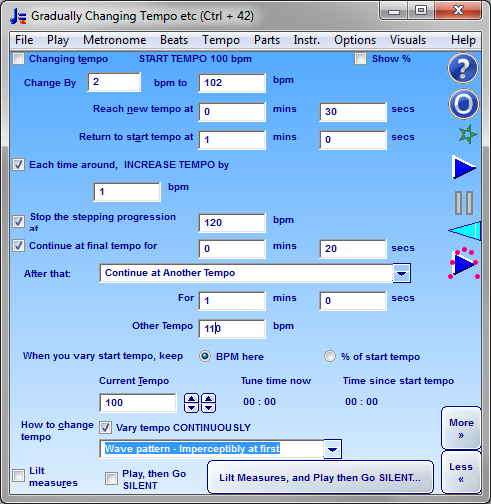
Can I set it to go faster and faster automatically for speed drills? Yes 4/4 with swing and gradually changing tempo The video shows a fast tempo change over a wide range, You can just as easily set it to change gradually over several minutes or longer. You can also set it to change by just one or two BPM or even just a fraction of a BPM as desired. Can it go silent briefly? Yes, the Play then Silent feature lets you do this. This feature lets you test how well you can keep a steady tempo without the metronome - plays for several measures then goes silent for a few measures. You have to keep playing, and see if you are still in time when the metronome starts to play again. The visuals keep going - so to do it properly you should look away or close your eyes when the metronome goes silent. TEMPO KEYBOARD SHORTCUTSYou can also tap at the desired tempo with the backspace key (chosen because it is large so easy to use when practicing). So - listen to the music in your mind's ear before you play - or play a recording, and tap at the same tempo with the backspace key and the tempo dial will automatically adjust to show the correct tempo. The tempo shortcut keys are carefully thought out with the attention to detail that characterises this program. Most are large keys, or easy to find on your keyboard. Keyboard shortcuts - use the left and right arrow keys to increase tempo by 1 BPM at a time or up or down arrow keys to vary by one notch at a time. This works throughout Bounce Metronome Pro. This is very useful when you want to play the same piece again one notch faster or slower. You can use the Return key to stop or start the metronome - again this is a large key on the keyboard so easy to use while practicing, when it could be fiddly to click on an on-screen button with the mouse. Just click on the large return key when you want to stop or start play. UP and DOWN arrows cycle through tempi (and optionally rhythms)You'll find an option in . When selected, the up and down arrow keys cycle through the list of tempi you set for it. You can also cycle through time signatures at the same time as you change tempo - e.g. 80 bpm in 4/4 then 30 bpm in 3/4 with 2 subdivsions then 120 in 6/8 or whatever. This is useful if you have several pieces with different tempi and / or time signatures that you want to practice in a single session. I added this feature in answer to this question at Yahoo Answers: Where can I get a good metronome for my PC? When unselected, up and down arrow keys adjust by one tempo dial notch at a time. Gradual changes of tempoYou can also set the dial to vary the tempo gradually over a number of seconds or minutes. As you play you will see the pointer on the dial gradually move up or down as the tempo changes automatically to play faster or slower as desired, so you can see what tempo you have reached at any time. This will help you to practice a piece at faster and faster (or slower and slower) tempi as you become more proficient. It will also help you when you want to practice the difficult art of professionally smooth slow and gradual tempo changes (shown in scores as Ritardando and Accelerando). One of the things that marks out a professional player is that when you want to change tempo gradually, you can do it in a regular way with the utmost smoothness. Bounce Metronome Pro can help you to learn this difficult art. Stepping ProgressionYou can set up a stepping progression such as to go up by 2 bpm, then down by 1 bpm, and repeat. in . E.g. suppose you have set it to automatically increase by 2 bpm, then drop down by 1 BPM. Now you can also set it to repeat that endlesesly as e.g. 100 102 101 103 102 104 ... Then you can set a maximum tempo to stop the stepping progression at, and also set what happens when the progression ends. Here is a screenshot to give the idea:
Automated conducting of all the rhythms for an entire pieceFor more advanced users, you can also make a script with all the tempo and time signature changes for an entire musical piece. It can change rhythm automatically at all the right bar numbers for the music - and with support for repeats, and flow directions (like Da Capo Al Coda etc). Don't worry - this isn't that technical, the script is simple and easy to understand. Then you can just click the play button and watch it conduct all the rhythms for the piece.
Or download your 30 day Free Test Drive - including your free taster time signature metronome which is yours to keep whether you buy or not
More Videos:Watch Gravity Bounce |



|
|
|
♥ |
| Disclaimer |
| products - music - Bounce Metronome |  |
| free of spyware etc |  |