Gravity Bounce Conductor - What makes it so easy to play in time with this metronome? skip - skip back
The innovative gravity bounce conductor helps you to play exactly on the beat. This is especially useful when you are learning a rhythm with swing, syncopation, or irregular beat patterns.
So, how does it work? We are used to how things bounce, and it is easy to anticipate the moment of the bounce.
So, these visuals let you see each beat just before it happens. This helps you to hit the beats exactly on the beat, like following a conductor. It is a great tool if you have a tricky new rhythm to learn, or wish to refine your ability to follow the ticks of a metronome or click track exactly in time with the clicks.
"It's like having your own conductor to help you keep in time"
I'll look more closely at why it works in the next section, How does the bounce help? Meanwhile here is another animation to show what it is like.
The metronome plays this with sound - also don't worry if the flash animation in this web page hesitates - the metronome doesn't do that . For details see Animation glitches.
Note, if you came here looking for a Karaoke machine, sorry, this software can't help you. Singers and a live band can use this tool during practice sessions to work on timing. But you can't synchronise the lyrics with a pre-recorded mp3 or midi file - not yet anyway. See Karaoke.
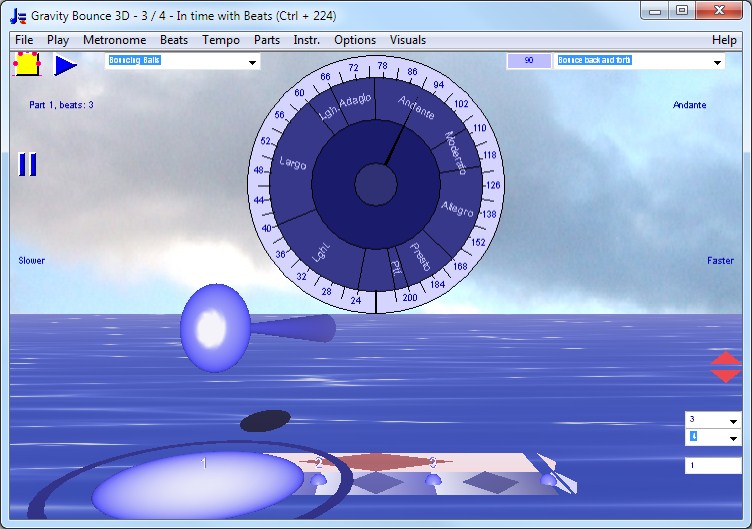
Here is the scene in 3D in all its detail.
This is just a screen shot of the 3D window, not the metronome itself. It doesn't play anything, you need to download the program to try it out.
In the 3D metronome you click on dial to set tempo, and of course can use all the tempo dial shortcuts or enter a tempo as text. The sea is animated in the downloaded programs - that's an extra touch which makes it pleasant and relaxing to use the metronome. The splash effect helps you to see the moment of the beat clearly.
You can use the numbers to the right to set the time signature and number of subdivisions, or adjust the beats per measure by hand to make polyrhythms - so in this way can do many tasks entirely within the 3D window
To find out about its other features see Details and Features. If you have already downloaded it and wish to purchase, see Purchase. Note that there is a Money Back Guarantee if you purchase it and then find it isn't suitable for your needs.
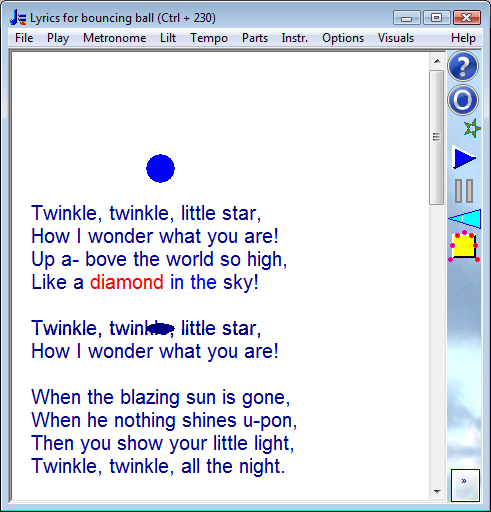
This technique was used in the "Car tunes" movies towards the end of the silent movies era and for the first movies with sound. The ball bouncing on the lyrics helped the audience to sing along with the movie. Bounce Metronome now has a separate "Car Tunes" metronome. The shadow below helps to make the moment of the bounce itself easier to see:
As you see it in the program itself, this time for Twinkle Twinkle Little Star
Conductors also use the same technique - they conduct with a bounce of the baton, or "ictus" to show the start of each beat. One style is to bounce the baton off an "invisible plane". These bounces make it easy for the orchestra to anticipate the exact moment of the beat so that they can keep in time.
"The motion is like bouncing a golf ball on pavement. Your performers must be trained to play exactly at the bottom of the beat."
P 19, Brock McElheran, "Conducting Technique for beginners and professionals", revised edition (1989).
Indeed, since the bounce indicates the beat with the precision of a conductor's baton, you can switch off the sound for Bounce Metronome and use it for practice as a silent metronome.
It is true that you can also use other types of metronomes visually too - for instance an animation of a traditional pendulum metronome (try that one with the sound switched off). It does work, to some extent at slow tempi. But they aren't designed especially to be used like this, and it's not so easy somehow especially at faster tempi or if you want to hit the exact moment of the beat with precision. For some reason, you kind of get dizzy and confused when you try. It doesn't have the naturalness of the Gravity Bounce.
The bounce is what gives Bounce Metronome Pro its naturalness and makes it so easy to follow. Then the extra visual effects in the software help to reinforce the moment of the beat clearly. So - that includes the splash effect, the shadows, and the "ictus" flick of the baton at the start of each beat for the conducting patterns. The shadows help because the ball and its shadow come together and seem to "hit" each other at the exact moment of the beat - just as the shadow of a bouncing ball helps you see when it will hit the ground on a sunny day, and the shadow in the bouncing lyrics.
The bounce effect also makes it much easier to practise rhythms with swing and irregular beats as you can anticipate the exact moment of an irregular beat visually - you can anticipate the moment in the same way you can anticipate when a ball will bounce. So you can see when to play the note before you play it - which helps you play it exactly in time.
That's why it is so suitable for rhythms with swing and irregular beats. It is like having your own personal conductor to help you keep in time.
If you want to play accurately in time with the beats, play so that it feels as though the notes you play make the splashes. The note you play and the metronome tick (if played) merges together.
That is - unless you want to practice following an orchestral conductor. Orchestral conductors generally conduct a moment or two ahead of the beat. The baton still indicates the moment of the beat crisply, but the players play each note a fraction of a second after the baton. You can set the visuals to play before the sound in the Bounce Preferences window - if this is your preference.