
|
|


|
New developments in Bounce Metronome - recent highlights.For full details see the What's New page. Version number is now 4.1. Sunday August 8th, 2010 Option to Start when your Computer Starts easier to find. Monday August 2nd, 2010 Three New metronomes for Polyrhythms such as 4/4 over 4/3, Mixed meters such as 4/4 + 7/8, and separate Flamenco metronome.Some videos of them in action will probably help. Polyrhythms with mixed note typesThis shows 4/4 over 4/3 - it's like a 4 over 3 polyrhythm but you count 4/4 in both parts - so the 4/3 though it has three beats to the measure of the 4/4 rhythm, is played with emphasis every four beats, so has a measure that is a third longer than the 4/4. The way you read 4/3 is that it is four "third notes" per measure where a third note is a third of the size of a whole note, just as a quarter note is a quarter of the size of a whole note. So four "third notes" have the same duration as one and a third whole notes.
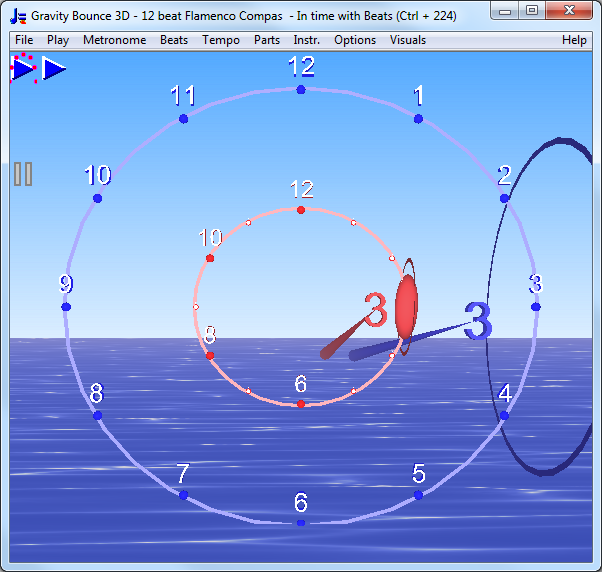
Flamenco Compás "Clock"This is for the Flamenco 12 beat clock - so same as the existing Flamenco "clock" preset which was added in Wednesday May 12th 2010 but with a special metronome now to itself. Flamenco Compás "Clock" with syncopation on sixteenth notes Mixed meters with mixed note typesThis lets you play rhythms like 4/4 + 7/8 or 2/4 + 3/8. Here is 4/4 + 7/8, all together as one large mixed meter - with swing and subdivisions, with all the original beats divided into two subdivisions and then swung (giving sixteenth notes in case of the 7/8).
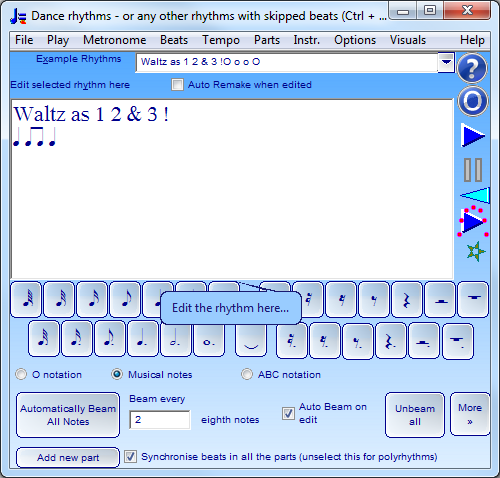
New windowsThe Conducting patterns window lets you set your own custom conducting patterns - there I just mean the order of the beats such as 3 1 4 2 - doesn't yet let you rrecord a conducting pattern e.g. with mouse or video and play it back. The Label Beats lets you label individual beats as you like, including a beat boxing feature and an option to auto convert beat boxing syllables to corresponding non melodic percussion instrument sounds that get played on the same beat. Here is a video for the new option to show beat boxing syllables and auto convert them to the corresponding non melodic percussion instruments to play The Custom Beats per Measure window is one you won't use that often but gets auto set for the new metronomes where it is needed e.g. for 4/4 over 4/3 to keep track of the two measures which are different in size and for 4/4 + 7/8 to keep track of where one measure ends and the next begins when you make it all as a single measure. Other new featuresMore drum rudiments in the drop list for the Drum & Dance metronome. New button to make a roll with any number of strokes and a buzz roll in Dance rhythms - or any other rhythms with skiipped beats (Ctrl + 228) Button to make it as a Buzz Roll. Here is a video.
Now shows the size of the smallest note value as a drop list with all the notations (not just abc) - and you can change this and if you select another note type from the drop list - then remakes the entire rhythm. So for instance if you want to show your paradiddles using eighth notes or sixteenth notes or whatever, just select the appropriate note value from the drop list and the rhythm will update accordingly. Now has a free taster metronome - after your test drive expires or if you haven't yet started it - you can run the basic metronome as a free taster - with some of the features hidden. Basically like the other ones but the only rhythms you can make are the standard 1/4, 2/4, 3/4, 4/4, 6/8, 9/8 and 12/8. You can make other rhythms in the other metronomes and then switch to the free taster to play them, so this gives you a free (though deliberately a bit awkward to use) method to play any of the rhythms in the free taster. What's new since first release of Bounce Metronome Pro 3.1 These are extra features I added in incremental updates of Bounce Metronome Pro 3.1 Wednesday June 30th, 2010 New
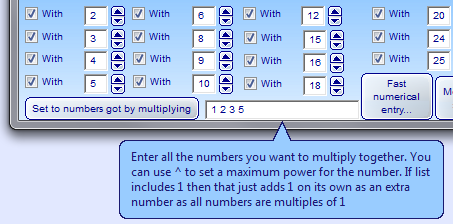
feature for rhythmicon. Easy ways to make it with only 5 limit harmony,
for instance - you set all the numbers you want to multiply together
e.g. (1) 2 3 5, then it will make the rhythmicon - in that case with the
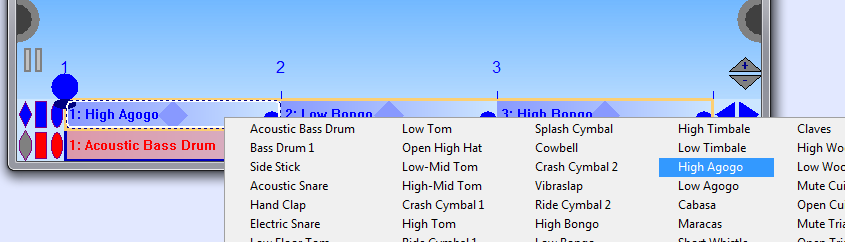
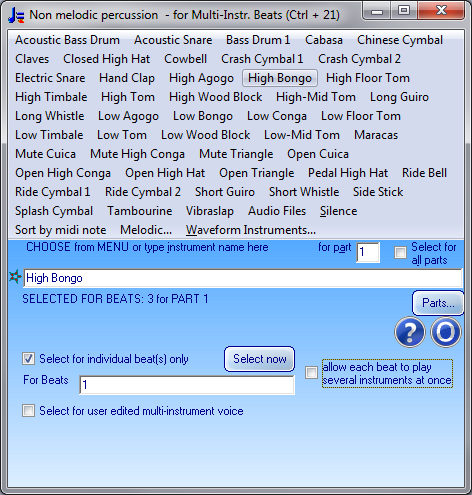
harmonics 1 2 3 4 5 6 8 9 10 12 15 16 18 20 24 25 so leaving out the more exotic 7, 11 and 13 limit harmonies Option to select separate instruments for each beat in the rhythm: And what it looks like in the new expanded version of the instrument menus:
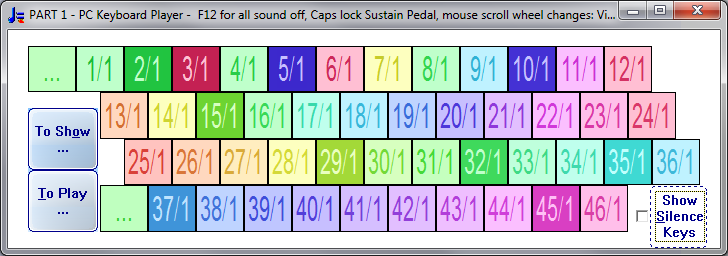
For rhythmicon then did it so that you see the complete range of harmonics (or subharmonics) when you unselect "Silence keys" to play along with it.
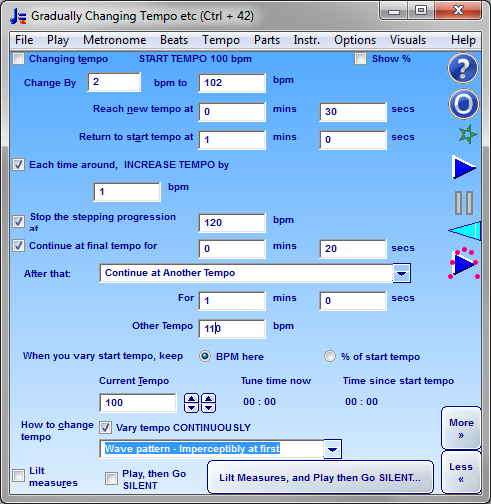
Added the Lissajous patterns window - which you may be familiar with if you use Tune Smithy. You can read about them here: Lissajous patterns for Tune Smithy. Added new options to the . So the up and down arrow keys cycle through the list of tempi (and optionally time signatures) you set for it. You can also cycle through time signatures at the same time as you change tempo - e.g. 80 bpm in 4/4 then 30 bpm in 3/4 with 2 subdivsions then 120 in 6/8 or whatever. This is useful if you have several pieces with different tempi and / or time signatures that you want to practice in a single session. I added this feature in answer to this question at Yahoo Answers: Where can I get a good metronome for my PC? When unselected, up and down arrow keys adjust by one tempo dial notch at a time. New version of with the stepping progression. E.g. suppose you have set it to gradually increase in tempo by 2 bpm over a period of time, then gradually drop down again by 1 BPM. Now you can also set it to repeat that endlesesly as e.g. 100 102 101 103 102 104 ... Then you can set a maximum tempo to stop the stepping progression at, and also set what happens when the progression ends. Here is a screenshot to give the idea:
For (in droplist of metronomes) - added Triplet rhythm version of the rhythmicon. Uses the pattern quarter note, eighth note repeated. Also serves as an example to show how you can make other versions of the rhythmicon with varying beat sizes. Wednesday May 19th, 2010 Added to . Here are a couple of screen shots:
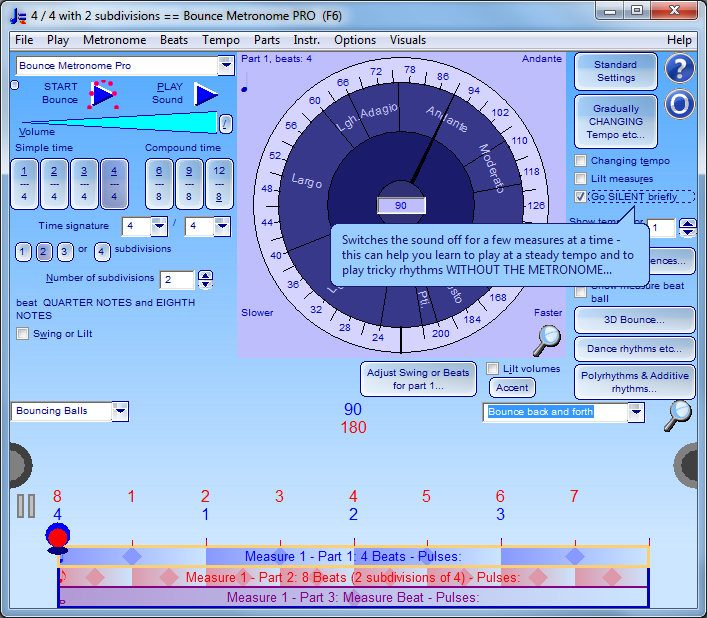
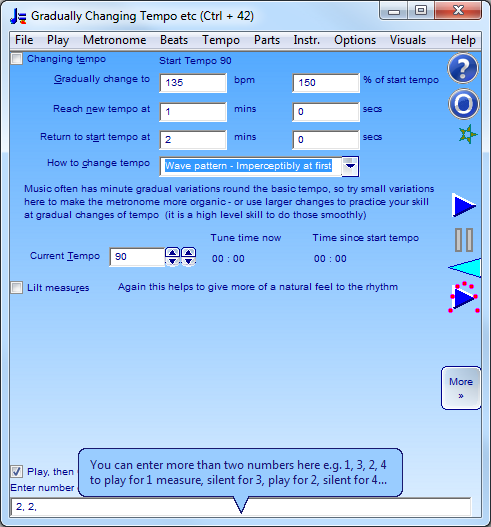
The idea here is that you continue to play when the sound stops. Then when the sound comes back again, aim to be exactly in time with the metronome, or as close as you can get to it. You can try this either with or without the bouncing ball visuals as an extra cue to help you stay in time. One reason to do this is to help you to learn to keep a steady tempo without a metronome. You can also use it when you learn tricky rhythms e.g. polyrhythms etc, to see if you can keep them going during the measures when the metronome is silent. Wednesday May 12th 2010 First introduction of the Flamenco "Clock" preset to the Drum Metronome. Here is a screen shot:
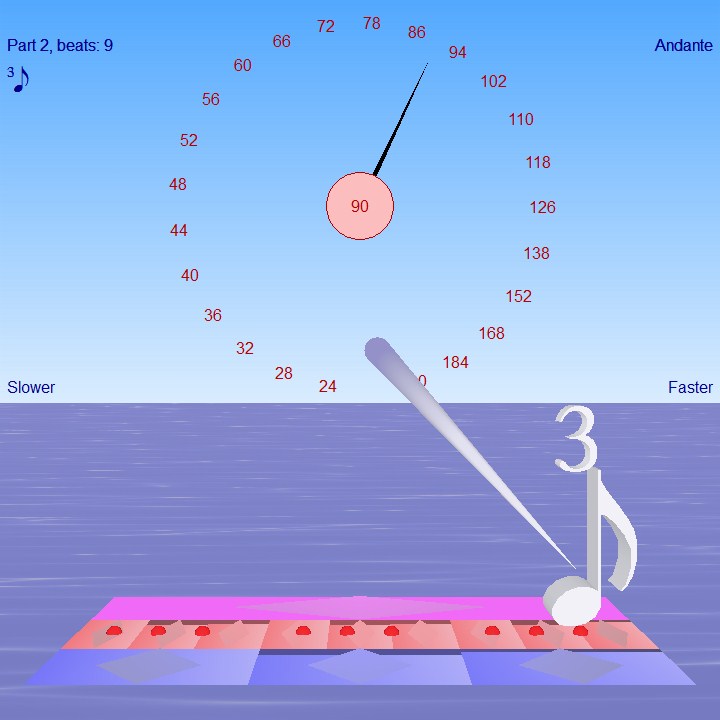
Wednesday March 31st 2010 For bouncing note symbols - and the note symbol on the tempo dial - now shows 3 beside the note for triplets, 5 for quintuplets etc. Here is a screen shot:
Added: in More version of Only affects the 3d bouncing musical notes - lets you show the number above the note instead of to the side. In 2D it's always to the side for now. Screen shot shows that option switched on so above the note. Monday March 29th 2010 Added and (for bouncing balls or baton) to - helps make the 3D baton easier to see. Thursday March 18th 2010 Added the Bach musicological font to Bounce Metronome Pro, and use this to show musical note sizes in the program - e.g. on the tempo dial, and a new option for bouncing musical notes. New rhythm edit window for the drum metronome.
Thursday February 25th 2010 You can now show any Bounce Metronome Pro window FULL SCREEN. To do that just press the ESCAPE key - or choose from the menu for the window. You press ESCAPE again to return to normal. You can use SHIFT + ESCAPE to show the menu full screen for windows with a menu (or to hide the menu if already shown). Added an button to main window. When you click on it, accents the beats. If already set to accents, changes to accents - with the accents on the weak notes between the main beats of the bar so a syncopated type effect. Clicking again changes back to normal accents on the main beats. It gives you a quick way to swap between accents or jazz type syncopation for an entire bar with one click. Monday February 15th 2010 Added new Pink Cherry Blossom Software Metronome skin based on the famous Mount Fuji seen through cherry blossoms - one of the views of Mount Fuji by Hokusai. Monday December 28th 2009 You can now use Ctrl or Shift + left or right arrow to micro-adjust the tempo by a fifth, tenth or (both together) a hundredth of a BPM. Monday December 21st 2009 Adds sound to the animation save with a new window This includes an option to automatically convert midi recordings to WAV using the timidity plug in which you can get from the Extra Downloads page. Added support for Windows 7 multi-touch - to play chords with the PC Keyboard Player (Ctrl + K or Ctrl + 112) and in other places e.g. you can adjust the timing of several beats simultaneously or accent / skip several beats at once in the Bouncing Balls display. To try this out if you have a multi-touch device, switch on Recognise MultiTouch in the Options - General (Ctrl + 202) dialog. I'll be doing more work on this later. Monday November 23rd 2009 window is now active - in the Tempo drop menu. What it does is to add a tap timing strip to the 2D bouncing balls window which you can use to practice tapping ahead of the beat, behind the beat and on the beat. Thursday November 19th 2009 Big improvement in the animated skins so that they now work smoothly on a fast enough computer, with no flickering text at all. Also added animated sea examples for the 3D scene, preset to show the simplest example which is animated just by turning the image around in 3D so that you see the texture from different angles - gives an effect like waves breaking in a light breeze on a fairly calm day. Tuesday November 3rd 2009 Saturday October 31st 2009 As an experimental feature i've also added animated skins. The background image for the skin can actually be an animation, again just drop the animation into the skins window to use it as a skin. This work on streamlining the textures to make them suitable for animated skins also has had the effect of making the skin change more instantly and smoothly when you change settings in the Skins window and for window contents to update more quickly when you resize a window or maximise or restore a window. Adds arrow key shortcuts to easily change tempo by one BPM or one notch. It's left and right arrows for BPM and up or down arrows for notches. Wednesday October 21st 2009 Adds option to hide the main window - go to File | Hide Main Window. Adds animated textures for the sky, sea, bouncing balls and background to the 2D bouncing balls. Monday October 12th 2009 Added and to the window: This lets you start play at any measure (bar) in the tune - previously you had to start at a particular time but measures are often more convenient for rhythms. Also you can set it to stop automatically as well. Tuesday September 22nd 2009 Added . Thursday September 3rd 2009 Program is now thoroughly tested in Windows 7. Added. This lets you make smoothly looping animations of any of the rhythm videos e.g. for a web page. You can also make an image for any moment of time in the rhythm, and print it out to printer's resolution too if you wish (except for the bouncing lyrics - they are currently limited to your screen resolution). I'll be using it to add many more animations to this web site in the near future. Added When ready, this should help you to synchronise the midi notes of the metronome when sent to another program that recognises the use of the Midi "Clock" messages to synchronise tempi. However it is work in progress, based on the same window in Tune Smithy 3.1 and will need some testing to make sure everything is working as expected in BM Pro Sunday August 9th 2009 Added , and to . Added to the droplist of auto pan styles in Sunday July 12th 2009 Added half circle controls to left and right of the bouncing balls display which you can use to show / hide the blocks or the parts adjustments. This means those extra check boxes can be removed from the main window leading to a simpler more streamlined look. Also you can show / hide them within the bouncing balls display as a separate window. The half circle controls themselves can be hidden if you prefer, using in the Monday June 22nd 2009 New version, now at 3.2 because of significant improvements in the layout and some important new features. Now the main window has a drop list of many different types of metronome. So now it is much easier to find the particular features of interest to you. The complete list is: Bounce Metronome Basic is completely new. In , added . Also added which is again what you normally expect for an ordinary swing rhythm. Added new feature to adjust the volumes of individual beats in the main window using the middle mouse button (scroll wheel used as a button in scroll mouse) or Shift + left click. Also you can now accent individual beats or unaccent them or make them quieter than usual with the right button. IAdded silence keys shortcuts. If the keyboard focus is set to a button, check box or anything that doesn't expect character entry then you can use the number keys 1 - 9 and the first few letters of top row of the PC keyboard to silence or play the parts of the rhythm. For edit fields or PC keyboard player you can switch on these shortcuts with Shift + Space Added quick key shortcuts: Return key to play / stop the rhythm. The Return key is normally used for the default (i.e. preset) action in a dialog. So this is like making the play / stop rhythm the default action for most of the windows. The main difference is that when you press the return key then the keyboard focus stays with whichever control you are using, it doesn't jump to the Play button as it normally would. Backspace to set the tempo by tapping at the tempo you want. Again shortcut to switch this feature on even for text fields - use Alt + backspace. Similarly Ctrl + space to tap out a rhythm for the currently selected part using the space bar. Added option: to The new thing here is that you can now unselect this. This makes it easier to skip beats as you just need to click on the beat itself, not on the diamond or oval shape within it. So for new users, it is preset to unselected. New main windows in version 3.2Here are the new metronome main windows: Bounce Metronome BasicBasic metronome with time signature, and sub-beats. Bounce Metronome ProAll the features of the PRO metronome accessible within one window. If you want to focus on one particular feature then try one of the more specialised metronomes. Swing MetronomeUse this to practice swing or to use lilt for a more lively rhythm. Drum & Dance MetronomeFor drum rhythms such as paradiddle, and dance rhythms mixing crotchets, quavers and so on. You can select from a drop list of rhythms or enter a new rhythm. Polyrhythm MetronomeUse this to practice polyrhythms (cross rhythms) such as 2 beats to a bar with 3 simultaneously, or 3 with 4, 3 with 5 etc. Additive MetronomeTo practice additive rhythms such as 2 + 3 (i.e. 5/4 divided into two beats followed by 3 beats) or 3 + 2 + 3 etc. Additive Polyrhythm MetronomeHere you can make a cycle of rhythms and polyrhythms one after another. Useful for long additive rhythms with many rhythms one after another or a cycle that combines ordinary rhythms with polyrhythms. Fractional Rhythms MetronomeFractional rhythms here are ones with either a fractional (e.g. 2.2) or irrational (e.g. golden ratio or PI) number of beats to the bar. The beats drift in and out of phase with the bar line. Tap out a rhythmUse this to tap out a rhythm and then play the bouncing balls metronome to follow the rhythm of your taps. Harmonic MetronomeHere the idea is that each number of beats per measure is assigned a pitch, so e.g. 7 beats to the bar corresponds to the seventh harmonic, 5 beats to the bar corresponds to the fifth and so on. The results sound harmoniously together as they use pitches from the harmonic series. This idea is related to the Lambdoma arrangement of pitches, and to Theremin's Rhythmicon. Originally suggested by Barbara Hero and may be of interest for music therapy. Additive Polyrhythms Harmonic MetronomePlay a cycle of rhythms and polyrhythms one after another with the pitches following the harmonic series. Fractional Harmonic MetronomeHere the idea is that you can use fractional or irrational rhythms e.g. involving the golden ratio or PI and combine that with the idea of using pitches corresponding to the number of beats to the bar. So PI / 4 will be played using two pitches at a ratio of PI to 4 to each other. The golden ratio rhythms are particularly interesting here because the golden ratio rhythm is in a sense the most polyrhythmic possible rhythm (ratio of beats most hard to approximate using a rational number). Similarly the golden ratio pitch interval is the most inharmonic possible pitch interval. It's a pleasant interval actually on most instruments - some inharmonic pitch intervals are very pleasant sounding (the ones that are often hard on the ear are e.g. detuned fifths, close to a very pure interval such as a fifth, octave or fourth,but obviously not hitting it). So this combination gives the most polyrhythmic possible rhythm combined with the most inharmonic possible interval. A Version of Theremin's RhythmiconLets you play a version of Theremin's Rhythmicon using the number keys on your PC keyboard and the first six keys of the first row of letter keys e.g. q w e r t y as the keys of your instrument. Theremin's Rhythmicon is an instrument with sixteen keys. Each key silences or plays a rhythm with a different number of notes to the bar, starting from 1 for the first key, 2 for second key all the way down to 16 for the last key. Each key also plays a different note of the harmonic series. Fractal Tune MetronomePlay the rhythms using fractal tunes. This is just a taste of what can be done in this way. It may give some idea of what your rhythm will sound like melodically. It also introduces you to the fractal tunes you can make with Fractal Tune Smithy.Note - at present Bounce Metronome Pro is at version 3.2. but FTS is still at 3.0. Bounce Metronome Pro has many capabilities not in FTS such as the skipped beats for instance. So most of the tunes you make here can't be played in Tune Smithy itself until the release of version 3.0 hopefully some time in summer or autumn 2009. First release: Wednesday April 15th 2009 New features since the last release of the Rhythms and polyrhythms task include:
Also many new minor features, tweaks and improvements of the other features, improvements in the skin, improvements in usability throughout, and simplification of many of the windows to make them easier to use. Also many bug fixes. For earlier what's new and bug fixes, see What's new (Tune Smithy) I plan to use the same version number for all the stand alone programs derived from Tune Smithy so that you can easily compare the stand alone programs with the same tasks as components of Tune Smithy. For instance since the version is 3.1 this shows you that currently Bounce Metronome Pro is currently more up to date than the main program. Old installer: First release 15th April 2009 Earlier uploadsCurrent upload: 8th August 2010 Earlier uploads: 2nd August 2010 - 30th June 2010 - 22nd June 2010 - 2nd June 2010 - 29th May 2010 - 19th May 2010 - 12th May 2010 5th May 2010 - 29th April 2010 - 20th April 2010 - 17th April 2010 - 16th April 2010 - 12th April 2010 - 7th April 2010 - 31st March 2010 - 30th March 2010 - 29th March 2010 - 21st March 2010 - 19th March 2010 - 18th March 2010 - 1st March 2010 - 28th February 2010 - 25th February 2010 - 15th February 2010 - 11th January 2010 28th December 2009 - 20th November 2009 - 19th November 2009 - 5th November 2009 - 4th November 2009 - 3rd November 2009 - 3rd November 2009 - 1st November 2009 - 31st October 2009 - 31st October 2009 - 21st October 2009 - 14th October 2009 - 13th October 2009 - 13th October 2009 - 12th October 2009 - 24th September 2009 - 23rd September 2009 - 22nd September 2009 - 18th September 2009 - 17th September 2009 - 15th September 2009 - 13th September 2009 - 11th September 2009 - 9th September 2009 - 3rd September 2009s - 21st August 2009 - 15th August - 2009 - 11th August 2009 - 10th August 2009 - 9th August 2009 - 3rd August 2009 - 25th July 2009 - 21st July 2009 - 20th July 2009 - 20th July 2009 (later version) - 17th July 2009 - 14th July 2009 - 13th July 2009 - 12th July 2009 - 6th July 2009 - 3rd July 2009 - 1st July 2009 - 27th June 2009 - 22nd June 2009 - 18th May 2009 - 30th April 2009 - 16th April 2009
Or download your 30 day Free Test Drive - including your free taster time signature metronome which is yours to keep whether you buy or not
More Videos:Watch Gravity Bounce |


|
|
|
♥ |
| Disclaimer |
| Products - Music - Bounce Metronome |  |
| free of spyware etc |  |